Choosing a L Shaped Computer Table in China involves more than comparing prices, colors, and glossy product photos. The right desk should support your work habits, room size, equipment, and long-term comfort. A crowded tabletop may look productive, but it can quickly become frustrating when monitors overlap, cables trail across the floor, and drawers block your knees.
This guide examines materials, dimensions, load capacity, assembly quality, storage, and supplier reliability. It also considers common Chinese manufacturing details, including engineered wood thickness, edge sealing, powder-coated steel, and packaging protection. These details matter. A 25-millimeter desktop usually feels more stable than a thin panel, but construction quality still varies between factories. Buyers should request product drawings, verified measurements, recent inspection photos, and clear warranty terms.
Ergonomist Alan Hedge is often credited with saying, “The best posture is the next posture.” That principle applies directly to an L Shaped Computer Table. A practical workstation should let you change position, move your keyboard, and keep your screen near eye level. Yet no buying guide can predict every user’s needs. A desk that suits a gaming setup may feel excessive in a compact office. Some advertised features may also sound better than they perform. Therefore, this guide encourages careful comparison rather than automatic trust. Measure twice. Ask better questions. A beautiful desk is not always a dependable desk.
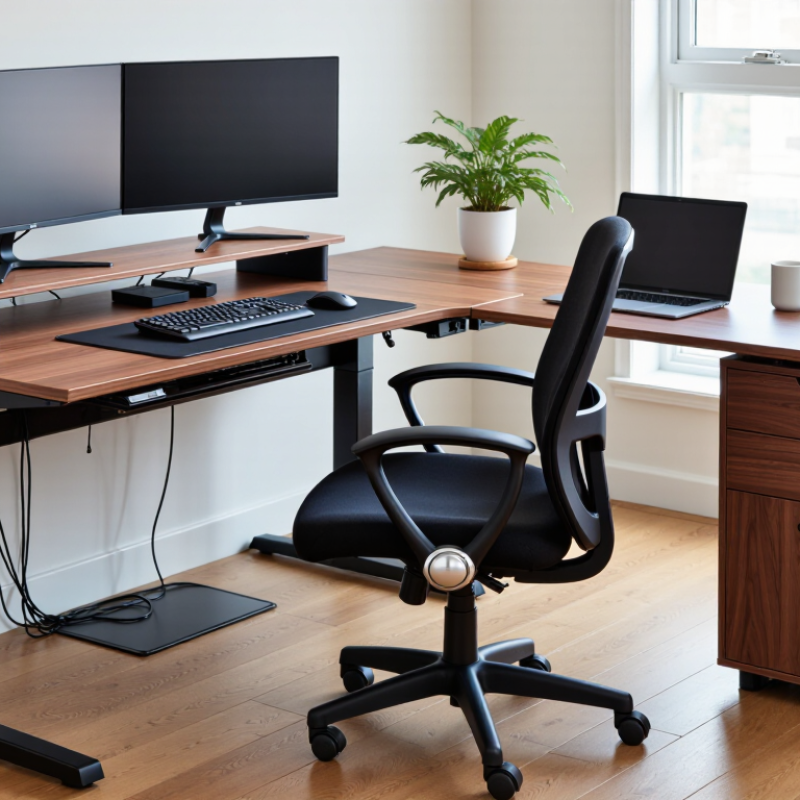
An L-shaped computer table made in China can offer flexible layouts, sturdy construction, and competitive pricing. Production quality depends on the factory, materials, and inspection process. Look closely at the tabletop thickness, edge finishing, frame joints, and adjustable feet. A 25-millimeter panel usually feels more stable than a thin board, especially with two monitors and storage equipment.
Ask for material details, dimensional drawings, and load-testing records before ordering. Reliable manufacturers should explain their board density, coating method, hardware quality, and packaging protection. Check whether the desk has cable grommets, reversible installation, and enough legroom. These small details affect daily comfort. In practical evaluations, corner seams often reveal more than attractive product photos. Uneven edges or loose screws may indicate rushed assembly.
Tips: Measure your room first, including door clearance and chair movement. Request a sample or detailed video inspection when possible. Confirm carton strength, replacement-part support, and production tolerances. Do not judge quality by price alone. A cheaper table may save money initially, but unstable joints create extra costs later. I would also allow a small measurement margin, because factory dimensions can vary slightly. That detail is easy to overlook.
China Best L Shaped Computer Table Buying Guide
Key Features to Compare Before Buying
A strong L shaped computer table should fit your room before it fits your equipment. Measure both walls, door clearance, and walking space carefully. I once chose a desk that looked compact online but blocked a cabinet when assembled. Leave at least 75 centimeters for comfortable movement. Confirm whether the corner returns left or right, since fixed layouts can limit placement.
Compare the desktop depth, not only its total width. A depth of 60 to 75 centimeters usually gives a monitor, keyboard, and writing area enough space. Check the stated weight capacity for screens, speakers, and storage items. Steel supports can improve stability, while thicker particleboard may reduce vibration. Press lightly near the corner and inspect for movement. Small movement becomes annoying during long work sessions.
Cable management also deserves close attention. Look for rear openings, under-desk trays, and enough space for power adapters. Rounded edges reduce wrist pressure during extended typing. Adjustable feet help on uneven floors, although they cannot fix a poorly designed frame. Assembly instructions should show clear parts and realistic steps. The return policy and warranty terms matter too. Read the fine print. My own mistake was ignoring keyboard height; the desk was attractive but caused shoulder tension. Compare usable comfort, construction quality, and maintenance needs rather than judging appearance alone.
| Feature to Compare | Practical Specification or Benchmark | Why It Matters | What to Check Before Buying |
|---|---|---|---|
| Overall Dimensions | Common L-shaped desk sizes range from approximately 1200 × 1200 mm to 1600 × 1600 mm. Larger workstations may exceed 1800 × 1800 mm. | The correct size provides enough room for monitors, a computer, documents, and accessories without overcrowding the room. | Measure the available corner space, doorways, stairways, and elevator openings. Confirm whether the listed dimensions include the desktop edges and storage units. |
| Desk Height | Fixed computer desks are commonly around 720–760 mm high. Height-adjustable models generally cover approximately 650–1250 mm, depending on the frame. | Proper height helps maintain a comfortable elbow position and reduces shoulder and wrist strain during computer work. | Compare the desk height with the user’s chair and leg length. For adjustable models, check the minimum and maximum height rather than only the advertised range. |
| Desktop Thickness | Engineered-wood tops are often 15–25 mm thick. A thicker top can provide improved rigidity and better support for monitor arms. | A stable desktop reduces vibration and helps prevent sagging under monitors, speakers, and computer equipment. | Confirm whether the thickness includes the edge banding. For clamp-mounted accessories, verify that the clamp can fit the desktop thickness. |
| Desktop Material | Common options include melamine-faced particleboard, MDF, laminated board, solid wood, and powder-coated metal sections. | Material affects surface durability, weight, moisture resistance, appearance, and total cost. | Look for a smooth, sealed surface, strong edge banding, moisture-resistant treatment, and a material description that identifies the board type. |
| Load Capacity | Many home and office computer desks are rated for approximately 50–100 kg of evenly distributed static load. The actual rating varies by frame and desktop construction. | Adequate capacity helps prevent deformation when the desk supports multiple monitors, a desktop computer, speakers, and storage items. | Check whether the rating applies to the complete desk or only the desktop. Ask for separate limits for shelves, drawers, keyboard trays, and monitor stands. |
| Corner Configuration | L-shaped tables may be left-handed, right-handed, reversible, or modular. Reversible designs allow the return to be installed on either side. | The correct configuration improves movement and makes better use of the room’s natural layout. | Confirm the return orientation, assembly direction, and whether the corner section can be reversed after installation. |
| Leg and Frame Construction | Common frames use steel, aluminum, solid wood, or engineered wood. Powder-coated steel is widely used for rigid office-desk support. | The frame influences stability, durability, resistance to wobbling, and the desk’s overall service life. | Inspect the leg profile, cross-bracing, weld quality, adjustable feet, and connection hardware. A wider support base generally improves stability. |
| Cable Management | Useful features include cable grommets, under-desk cable trays, rear wire channels, and openings for power strips. | Organized cables improve safety, cleaning access, and the appearance of a multi-device workstation. | Check the number and location of cable openings. Make sure the openings are large enough for power plugs and that cable trays are included rather than optional. |
| Monitor Support | A standard desktop can accommodate one or more monitors depending on its depth. A depth of approximately 600 mm or more is commonly preferred for monitor and keyboard placement. | Sufficient depth allows the screen to be positioned at a comfortable viewing distance while leaving room for input devices. | Measure monitor stand footprints and verify compatibility with monitor arms, including clamp clearance and maximum supported weight. |
| Storage Arrangement | Typical storage includes drawers, open shelves, CPU holders, printer shelves, or side cabinets. Storage should not block legroom beneath the main work area. | Well-positioned storage keeps frequently used items accessible without reducing the usable workspace. | Compare drawer dimensions, shelf spacing, door swing, handle clearance, and whether the storage unit can be placed on either side. |
| Legroom and CPU Placement | A clear knee area of roughly 600 mm or more in width is a practical target for comfortable seated work, although the ideal space depends on the user. | Adequate legroom supports a natural sitting posture and prevents contact with drawers, panels, or computer towers. | Confirm the position of support panels and cabinets. Measure the computer case and ensure ventilation openings will not be blocked. |
| Surface Finish | Common finishes include melamine, laminate, veneer, painted wood, and powder coating on metal components. | The finish affects resistance to scratches, stains, moisture, heat, and everyday abrasion. | Request finish samples or close-up images. Check that exposed edges are sealed and that the surface can be cleaned with a damp cloth. |
| Safety and Stability | A suitable desk should have level-adjustment feet, secure fasteners, rounded or banded edges, and a stable center connection at the corner. | These features reduce wobbling, floor damage, sharp-edge risks, and accidental movement during daily use. | Review assembly instructions, anti-tip provisions for storage units, floor-protection pads, and the availability of replacement hardware. |
| Packaging and Assembly | L-shaped desks are commonly delivered flat-packed in multiple cartons because of their size and weight. | Packaging quality and clear instructions help reduce transit damage and assembly errors. | Confirm carton count, package dimensions, estimated assembly time, required tools, spare hardware, and the inspection procedure for damaged parts. |
| Quality and Compliance Documentation | For commercial or institutional purchasing, request material specifications, formal test reports, and applicable safety or emissions documentation. | Documentation supports quality control, procurement approval, and consistency across large orders. | Verify that documents identify the tested product construction, test method, date, and issuing laboratory. Do not rely only on general marketing claims. |
| Warranty and Replacement Parts | Warranty periods and spare-part policies vary by seller, product structure, and destination market. | Reliable after-sales support reduces downtime if panels, fasteners, drawer runners, or adjustable feet need replacement. | Confirm warranty coverage, exclusions, response time, replacement-part availability, and who pays shipping for defective components. |
| Delivery and Import Considerations | For cross-border purchases, total cost may include product price, packaging, freight, customs duties, taxes, inspection fees, and local delivery. | The landed cost can be substantially higher than the quoted table price. | Request a complete quotation with Incoterms, carton dimensions, gross weight, lead time, minimum order quantity, and delivery responsibility. |
| Recommended Final Comparison | Compare at least three equivalent configurations using the same dimensions, materials, load rating, packaging terms, and delivery conditions. | A like-for-like comparison reveals the actual value more accurately than comparing unit prices alone. | Use a written specification sheet and obtain a pre-production sample or detailed approval drawings before placing a large order. |
| Note: Dimensions, load ratings, materials, packaging details, and warranty terms vary by product configuration and supplier. Always verify the final specification, test documentation, and landed cost in writing before purchase. | |||
Choosing the right L-shaped computer table starts with measuring the room, not the product listing. The U.S. Bureau of Labor Statistics reported that 22.5% of employed people worked at home on an average day in 2023. That makes flexible home workspaces increasingly practical. Leave at least 90 centimeters behind the chair for movement. A cramped corner quickly becomes frustrating.
Measure both wall lengths and mark doors, windows, sockets, and heating vents. For one monitor, a 120 × 120 centimeter configuration may be sufficient. Dual monitors, speakers, and paperwork usually need 140 × 140 centimeters or more. OSHA recommends a viewing distance of roughly 50 to 100 centimeters. Therefore, avoid placing the screen deep inside a narrow corner. It sounds obvious, but many buyers forget knee clearance.
Think about configuration, too. A left-return design suits right-handed note-taking, while a right-return layout may protect a window or walkway. Choose adjustable legs when floors are uneven.
OSHA also recommends positioning the monitor top at, or slightly below, eye level. I would not treat every measurement as universal. Body height, equipment size, and daily habits change the answer.
Test the layout with cardboard before ordering. It is cheap. It can reveal an awkward reach, blocked drawer, or unusable corner that a polished specification sheet may hide.
China Best L Shaped Computer Table Buying Guide
Material choice affects durability, comfort, and long-term value. Grand View Research estimated the global office furniture market at about US$58 billion in 2022, showing strong demand for practical workstations. For an L-shaped computer table, inspect the board core, not only the surface finish. High-density particleboard offers affordability, while plywood usually resists screw pull-out better. A 25 mm desktop feels firmer than a thin panel. Check its edge sealing carefully. Moisture often enters through exposed edges.
Stability deserves direct testing. ANSI/BIFMA X5.5-2021 provides performance guidance for desk products, including strength and durability testing. Ask suppliers for test methods and load results, rather than accepting “heavy-duty” as proof. Press down near each corner. The frame should not rock or produce sharp clicking sounds. Adjustable feet help on uneven floors, but they cannot repair a twisted frame. A crossbar under the corner usually improves rigidity, although it may reduce legroom.
Workmanship appears in small details. Inspect welded joints for continuous, even beads. Drawer runners should move smoothly without side play. Cable openings need clean edges and fitted covers. Confirm that screws enter reinforced inserts, not weak board alone. Packaging also matters; damaged corners can hide poor protection. Some buying decisions still rely on attractive photos. That is a mistake. Request assembly instructions, material specifications, and recent quality records. One practical weakness remains: published load ratings may reflect laboratory conditions, not years of daily use.
China Best L Shaped Computer Table Buying Guide
Finding Reliable Chinese Suppliers and Comparing Prices
When sourcing an L shaped computer table from China, supplier verification matters more than a low quotation. Request a current factory video, product drawings, material specifications, and recent inspection records. A reliable supplier should explain board thickness, edge sealing, load capacity, packaging, and replacement procedures clearly. Ask for a sample before placing a large order. Small details reveal working habits.
Compare prices using the same specification sheet. A quote may cover the tabletop but exclude cable trays, drawers, corner supports, packing, or inland delivery. Check whether the board is particleboard, MDF, or solid wood, and confirm the finish under normal lighting. Compare minimum order quantity, production time, payment stages, and shipping terms together. The cheapest offer can become expensive after revisions. Keep every promise in writing.
I have found that clear drawings reduce disputes more effectively than friendly messages. Use measurements in millimeters and mark the left or right return. Request photos of carton corners and hardware bags. Inspect one assembled sample for wobbling, sharp edges, uneven coating, and missing screws. No supplier is perfect. I once overlooked a modest packaging change, and several panels arrived damaged. That mistake taught me to approve packing photos before production, not after. Price matters, but repeatable quality protects the real budget.
This chart shows indicative China ex-works wholesale price ranges for common L-shaped computer table constructions. Actual quotations vary according to dimensions, materials, hardware, packaging, order quantity, and customization requirements.
Particleboard models are usually the most economical choice, while metal-frame, MDF, and solid-wood constructions generally cost more because of their materials, processing, and durability. When comparing suppliers, request the same specifications and confirm whether the quotation includes packaging, accessories, customization, and shipping.
Measure both walls, door clearance, and chair movement first. Leave about 75 centimeters for comfortable walking space. Factory dimensions may vary slightly, so keep a small margin.
A 25-millimeter panel usually feels steadier than a thin board. It supports two monitors with less vibration. Thickness alone cannot prove quality.
A depth between 60 and 75 centimeters usually fits a monitor, keyboard, and writing space. Deeper surfaces may improve comfort. Measure your actual equipment.
Yes. Confirm whether the corner returns left or right before ordering. A fixed layout may block a cabinet or restrict placement.
Inspect corner seams, frame joints, edge finishing, and loose screws. Uneven edges can suggest rushed assembly. Product photos hide these details.
Look for rear openings, under-desk trays, and adapter space. Good routing keeps cables away from your knees. It also reduces visual clutter.
Request material details, dimensional drawings, load-testing records, and packaging information. Ask about board density and hardware quality. A detailed inspection video can help.
Adjustable feet help on uneven floors, but they cannot repair a weak frame. Press gently near the corner and check for movement. Small movement becomes irritating.
Check keyboard height, legroom, rounded edges, and monitor position. I once chose an attractive desk that caused shoulder tension. Appearance was not enough.
Not necessarily. A low price may hide unstable joints or weak packaging. Read warranty and replacement-part terms carefully. Saving money initially can create later costs.
Choosing the right L Shaped Computer Table made in China requires more than comparing appearance and price. Buyers should first understand the table’s intended use, including whether it will support gaming equipment, office devices, storage, or shared work areas. Important features to compare include desktop layout, cable management, keyboard space, drawers, shelves, adjustability, and the ability to reverse the corner orientation. Measuring the room carefully is essential to ensure the table fits comfortably without blocking doors, windows, or movement.
Material quality, frame stability, surface finish, edge treatment, and assembly design all affect long-term performance. A reliable table should remain steady under normal loads and provide durable, easy-to-clean surfaces. When evaluating Chinese suppliers, review product specifications, customization options, quality-control procedures, packaging standards, minimum order requirements, and communication responsiveness. Comparing prices is useful, but the lowest quotation may not offer the best overall value after shipping, accessories, replacement parts, and service are considered. A balanced evaluation helps buyers select a practical, durable, and cost-effective computer table.

Union Home